Skip to content
Cleaning Operator

Run the office

Company settings and the office dashboard

The office runs on sticky notes, shared logins and me remembering everything.Cleaning Operator gives the office a daily home screen, your own branding, separate logins and a record of every email and text sent.

14-day free trial on every plan. Cancel anytime, no lock-in contract.

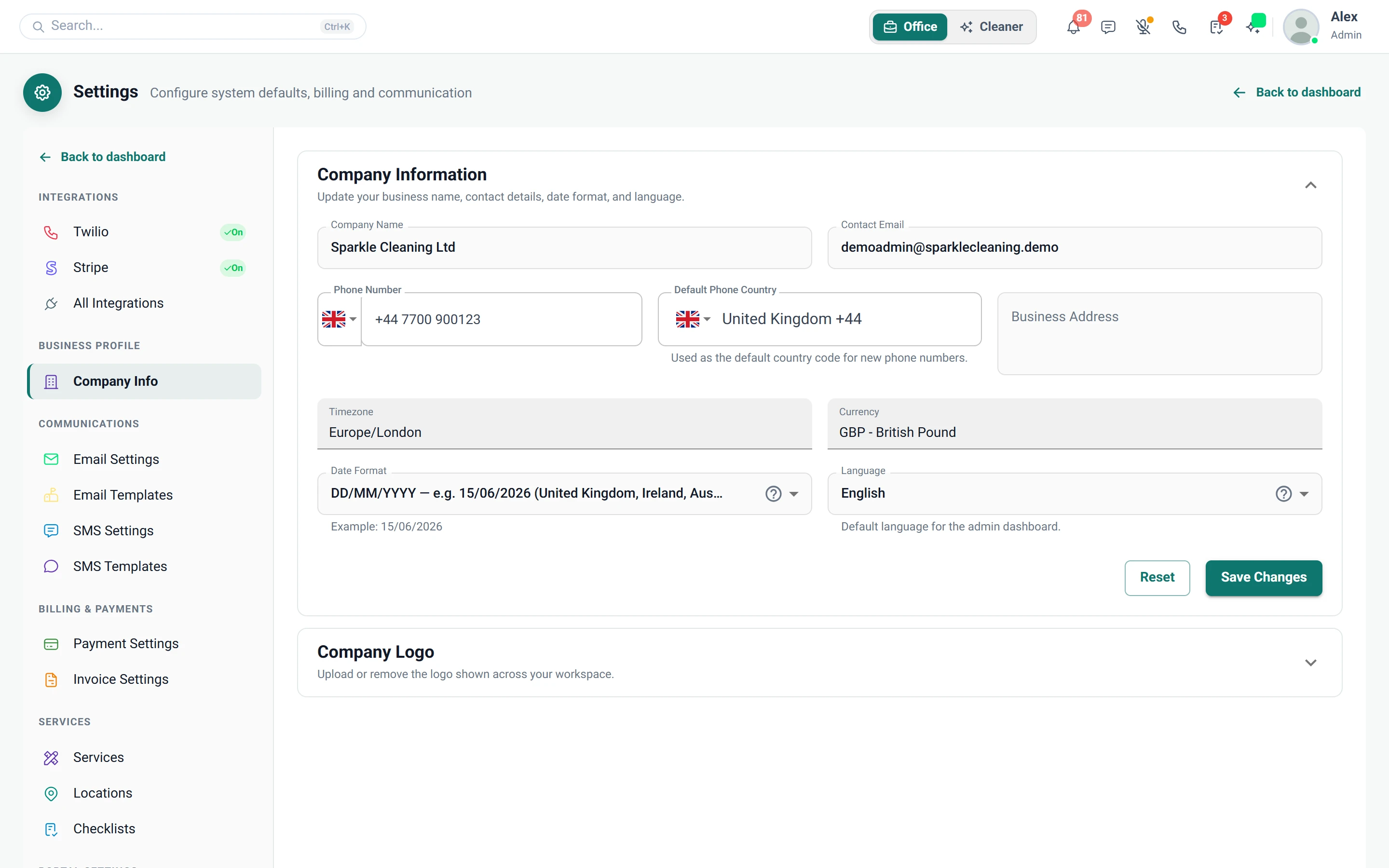
Screenshot of Settings — Company Info

What is included

11 features in Settings.

The problem each one solves, then how Cleaning Operator fixes it, with the screens and settings named.

  1. Company info

    Company name, logo, timezone, currency and contact details used on invoices, emails and customer pages.

    The problem

    Changing my phone number means updating invoices, emails and booking pages one by one.

    With Cleaning Operator

    One update reaches everything. Your name, logo, contact details, currency and date format feed your invoices, emails and customer pages.

    • Settings → Company Info
    • Currency, date format and logo apply across the product
    • Default phone country sets phone field defaults, for example UK
  2. Admin appearance

    Pick a dashboard theme for the office screens; the customer booking form is not affected.

    The problem

    My team stares at the same dull screens all day, and I'm wary of changing anything customers see.

    With Cleaning Operator

    Change the office look without touching what customers see. Pick a dashboard theme for admin and staff, and the booking form stays as it is.

    • Settings → Admin Appearance; applies to admin and staff users
    • Colours and layout of the office screens
    • Does not change the customer booking form
  3. Dashboard (admin home)

    The daily operations screen showing what needs you, today's schedule and a revenue snapshot.

    The problem

    Each morning I check the diary, payments, inbox and timesheets separately to find what's gone wrong.

    With Cleaning Operator

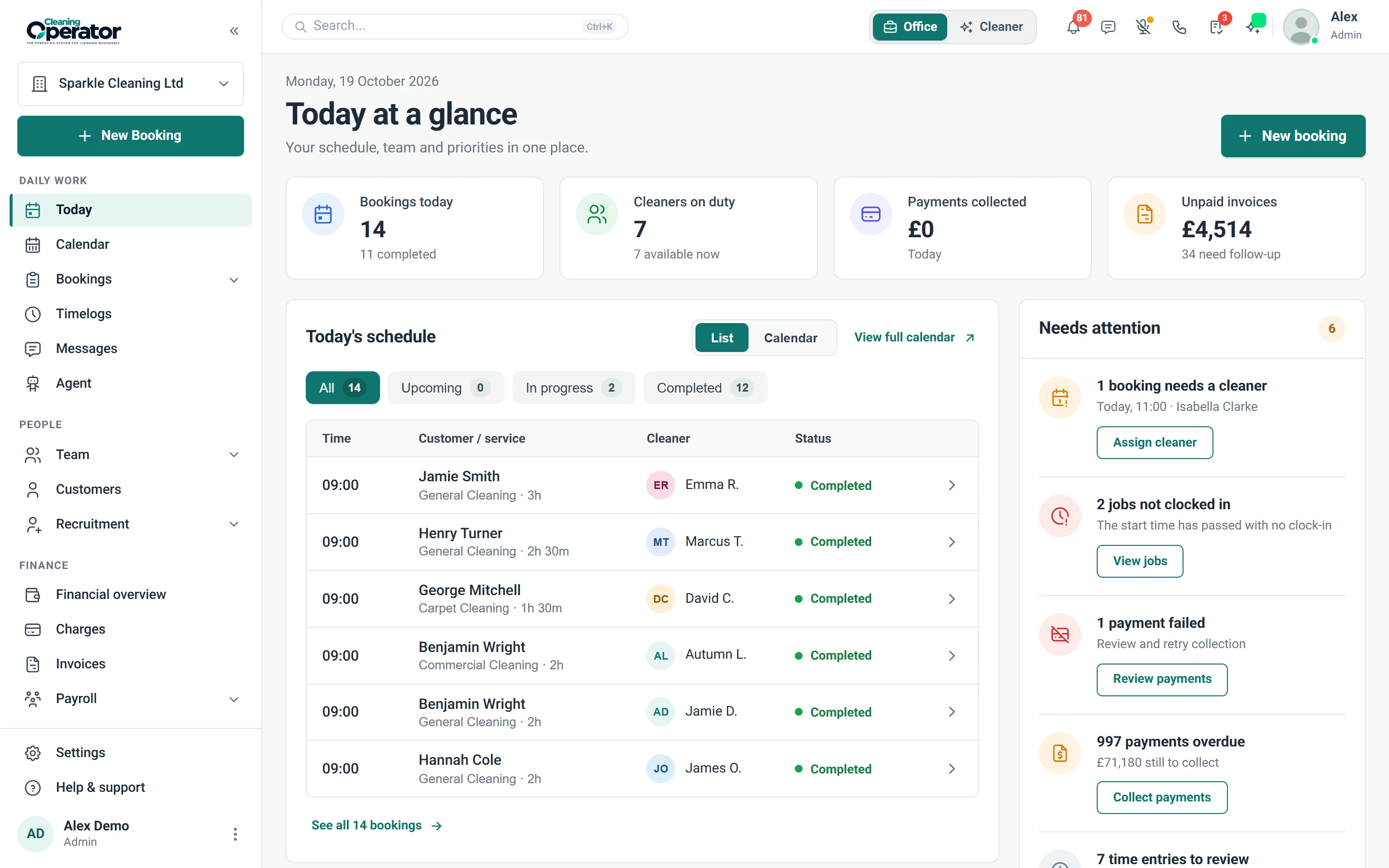
    Your morning starts with one screen. Failed charges, overdue invoices, unapproved timelogs and unread messages sit beside today's schedule and a revenue snapshot.

    • Needs attention: failed or pending charges, overdue invoices, unapproved timelogs, unread messages
    • Today's schedule, with alerts
    • Financial overview: revenue snapshot
    Screenshot of Dashboard — Needs attention
  4. Team users (admin and staff)

    Invite office users as Admin or Staff, each with their own login.

    The problem

    The whole office shares my login, so there's no telling who changed what.

    With Cleaning Operator

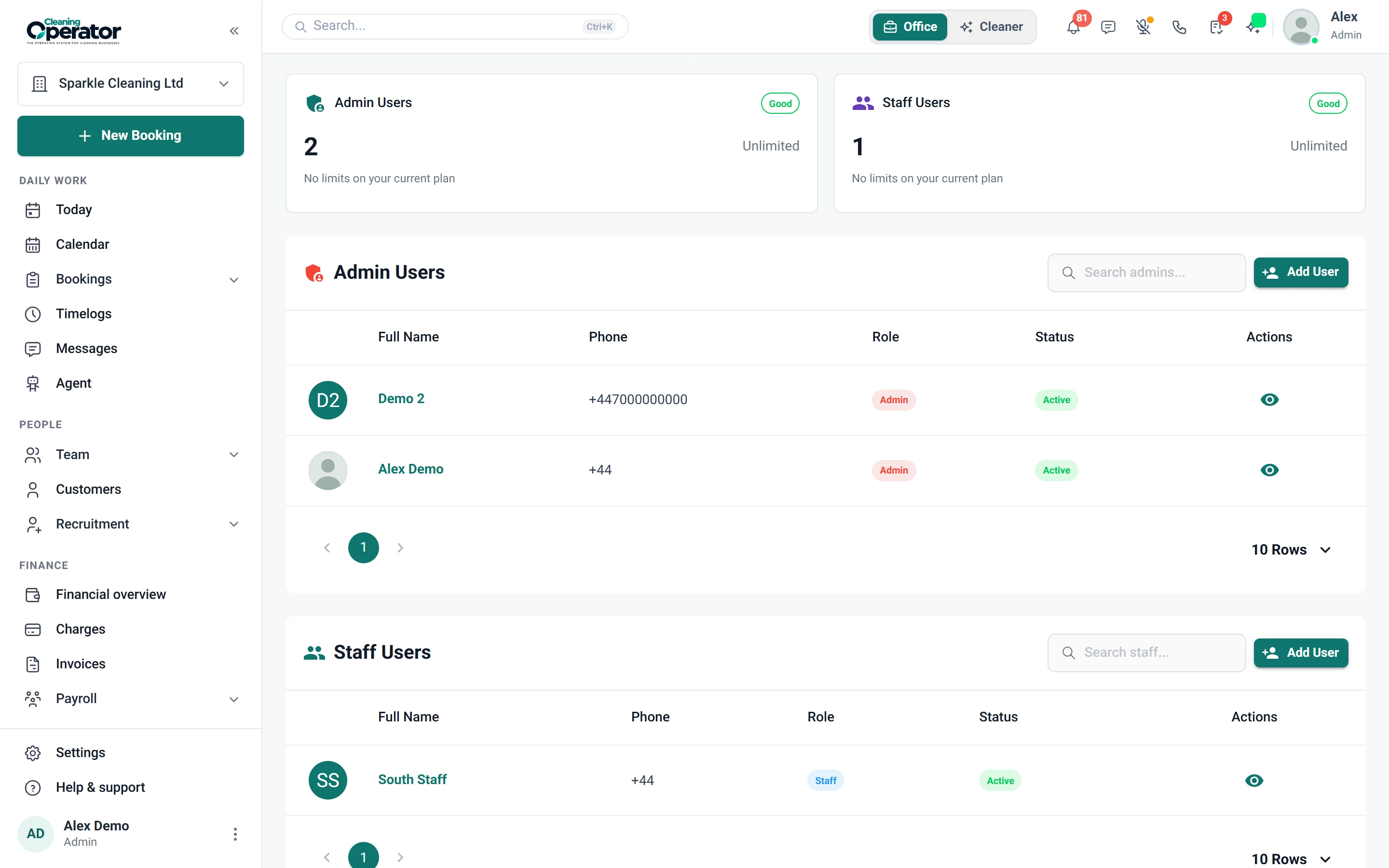
    Everyone gets their own login, as Admin or Staff. Change a person's role from their profile, and with locations enabled, keep staff to one service area.

    • Staff can be limited to a service area when locations are enabled
    • Plan limits can cap how many admins and staff you have
    • Open a user to edit profile and role
    Screenshot of Settings — Team users
  5. Setup wizard

    First-run setup of the business profile, service catalogue, team or solo, and optional demo data.

    The problem

    Switching software usually means an empty screen and no idea what to set up first.

    With Cleaning Operator

    Day one starts with services and cleaners ready, not a blank dashboard. The wizard covers business profile, catalogue, team or solo set-up and optional demo data.

    • Steps: business profile, catalogue, team or solo, optional demo data, then go live
    • Go-live is services and cleaners, rather than a blank dashboard
    • A setup checklist in the office reminds you of remaining steps
  6. Logs

    Email Log and SMS Log show what was sent, to whom and when.

    The problem

    A customer swears they never got the reminder, and I've no way to show it was sent.

    With Cleaning Operator

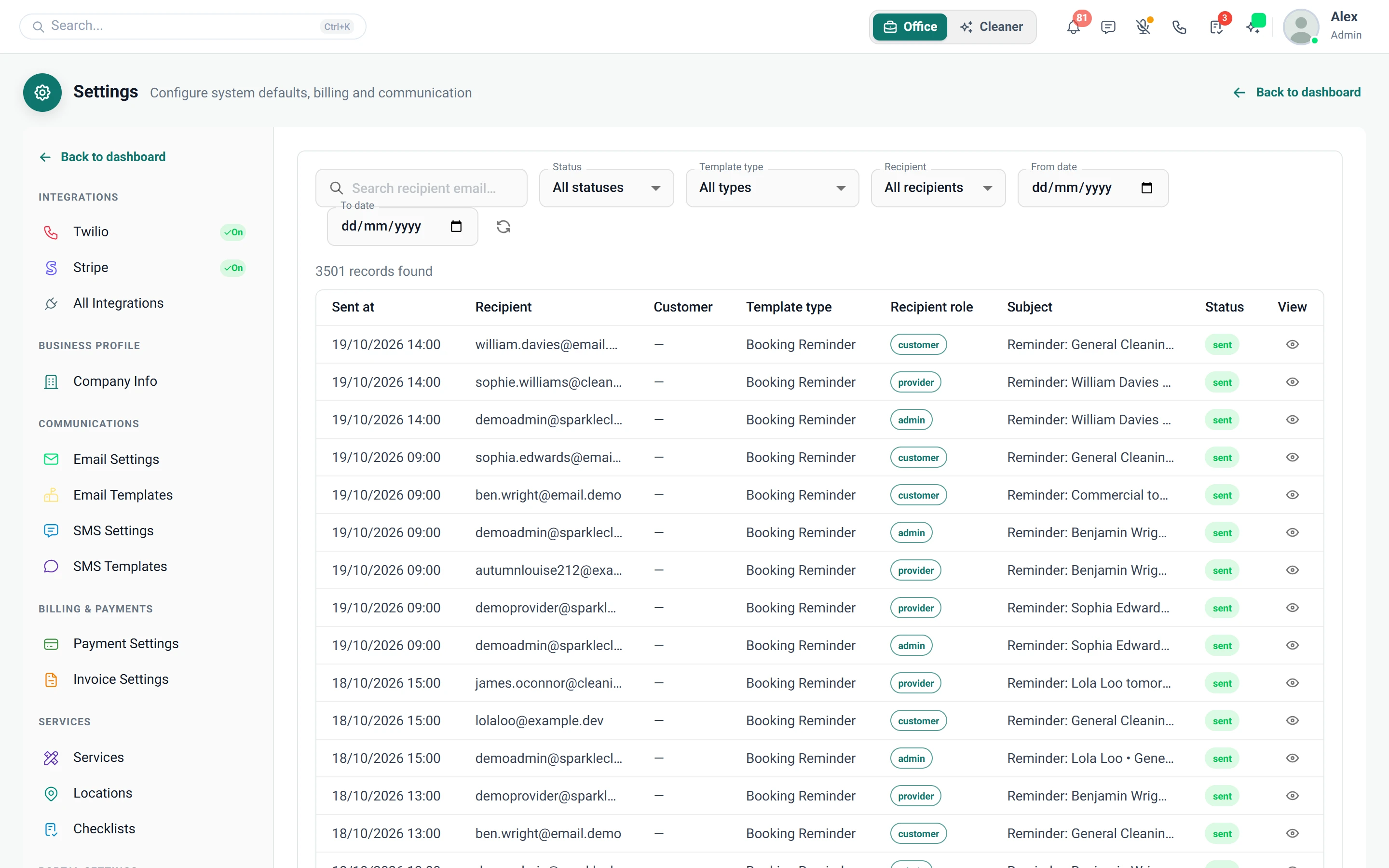
    You can show them exactly what went out. Email and SMS logs record what was sent, to whom and when.

    • Settings → Email Log and Settings → SMS Log
    • Shows what was sent, to whom and when
    • Proof for the reminder a customer says they never got
    • The SMS Log needs the Business plan or above; the Email Log is on every plan
    Screenshot of Settings — Email Log
  7. Public invoice pay page

    Customers open an invoice link and pay by card without logging into the portal.

    The problem

    Customers say they'll pay the invoice later, then can't remember their portal password, so I'm chasing again.

    With Cleaning Operator

    Paying takes one link, not a password. Send the invoice link and customers pay by card without logging in to the portal.

    • Send the invoice link
    • Card payment without a portal login
  8. In-app support

    Opens a support chat with Cleaning Operator from the header, to create tickets and track their status.

    The problem

    If something in the software stumps me, I'm hunting for a support email and waiting with no update.

    With Cleaning Operator

    Your question becomes a ticket you can follow. Open Help in the header, send messages and images, and check its status without leaving Cleaning Operator.

    • Header Help area: create a ticket, send messages, attach images, see ticket status
    • For admin and staff using the Main App, not end customers
  9. Setup checklist (ongoing)

    Lists the basics still to finish after setup.

    The problem

    Once we're busy, half-finished setup like text reminders gets forgotten until a customer notices.

    With Cleaning Operator

    Unfinished basics stay in view. A checklist shows what remains, from company profile and services to email, SMS, cleaners and customers.

    • Remaining basics: company profile, services, email/SMS, add cleaners, add customers
    • Can be hidden for the session once you are live
  10. Your Cleaning Operator subscription

    Billing overview for your own Cleaning Operator invoices and plan health, kept separate from customer payments.

    The problem

    My software bills get muddled with customer payments, and I'm never sure what my plan includes.

    With Cleaning Operator

    Your subscription stays apart from customer money. See your Cleaning Operator invoices and plan limits, such as calendar views and user numbers, in a separate billing overview.

    • Plan limits such as calendar views and number of admin and staff users
    • Kept separate from the money you collect from customers

Run the office

Related features.

16 — AI assistant

AI assistant: See AI assistant features

Ask by text or voice, or say its name, and the assistant does the office work across the dashboard, with your approval where it matters.

  • Agent page and side drawer
  • Live voice chat
  • Hands-free wake word

01 — Booking

Booking: See Booking features

Take the call yourself, let existing customers book online, or put a booking form on your website — same services, prices, and availability everywhere.

  • Admin booking form
  • Public booking form
  • Customer portal booking form (self-service)

Start today

Run the whole cleaning company from one system.

Online booking, the live team calendar, the mobile app, card payments and invoices, and payroll from clocked hours.

14-day free trial on every plan. Cancel anytime, no lock-in contract.