Skip to content
Cleaning Operator

87 features in 17 categories

Every job, every cleaner, every payment, in one place.

The complete reference, organised by how a cleaning company runs: winning the work, planning the day, running the team, getting paid, keeping customers close and running the office. Every entry below names the real screen or setting.

14-day free trial on every plan. Cancel anytime, no lock-in contract.

4 categories, 18 features

01 —Win more work

The phone rings all evening, and bookings still slip through.

01 — Booking

Booking: See Booking features

Take the call yourself, let existing customers book online, or put a booking form on your website — same services, prices, and availability everywhere.

  • Admin booking form
  • Public booking form
  • Customer portal booking form (self-service)
04 — Reviews

Reviews: See Reviews features

Ask for a rating after the visit, then point happy customers to Google.

  • Review request and public review page

3 categories, 11 features

02 —Plan every day

It is 7am and you still do not know who is covering what.

07 — Customers

Customers: See Customers features

One record for each client: addresses, cards, invoices, messages, and how they like to be contacted.

  • Customer list and add customer
  • Customer profile (admin)
  • Import customers

3 categories, 24 features

03 —Run your team

Cleaners ring all day for door codes, and new starters never show.

08 — Cleaner dashboard

Cleaner dashboard: See Cleaner dashboard features

Inside the Cleaning Operator app: today's jobs, clock-in, photos, chat and pay, on the phone in their pocket.

  • Sign in and workspaces
  • My jobs (Jobs tab)
  • Job details

09 — Cleaners

Cleaners: See Cleaners features

Keep your team, their contracts and documents, availability, and what they see in the app in one place.

  • Cleaner list, add, and profile
  • Pending verification
  • Availability and absences (office)

10 — Recruitment

Recruitment: See Recruitment features

Let people apply, score the forms, and hire into the same system they will work in.

  • Applicants
  • Recruitment settings
  • Cleaner self-registration (simpler path)

4 categories, 12 features

04 —Get paid faster

You chase card payments, then rebuild payroll in a spreadsheet each Friday.

11 — Payments

Payments: See Payments features

Take cash, save a card, or send an invoice — then collect what is due from one queue.

  • Stripe (card payments)
  • Add-card form (public / request a card)
  • Charges workbench (admin)

12 — Invoices

Invoices: See Invoices features

Send branded bills, remind people who have not paid, and let them settle from a link.

  • Invoice list and editor
  • Invoice settings

13 — Payroll

Payroll: See Payroll features

Pay from the hours they actually worked — then send payslips to the app.

  • Run payroll
  • Payroll history and payslips

14 — Reports

Reports: See Reports features

See what you earned, what you paid, and what changed — without exporting five spreadsheets first.

  • Financial report
  • Customer reviews report
  • Booking changes log

1 category, 5 features

05 —Keep customers close

Customer chats sit on a personal phone, and calls get missed.

15 — Messaging

Messaging: See Messaging features

Chat, text, email, and call from the same office — tied to the customer, not a personal phone.

  • Messaging centre (chat + SMS)
  • Email settings and templates
  • SMS settings and templates

2 categories, 17 features

06 —Run the office

Setup, branding and admin pile up, and you are never at your desk.

16 — AI assistant

AI assistant: See AI assistant features

Ask by text or voice, or say its name, and the assistant does the office work across the dashboard, with your approval where it matters.

  • Agent page and side drawer
  • Live voice chat
  • Hands-free wake word

17 — Settings

Settings: See Settings features

Your name, logo, team logins, and the everyday tools the office opens first.

  • Company info
  • Admin appearance
  • Dashboard (admin home)

The app

One app, two dashboards.

One app for the whole company, on iPhone and Android. Sign in and it opens the dashboard for your role: the Office dashboard for admins and staff, the Cleaner dashboard for cleaners. The web dashboard is there for the desk. Both dashboards work from the same bookings, customers and cleaners as the web dashboard.

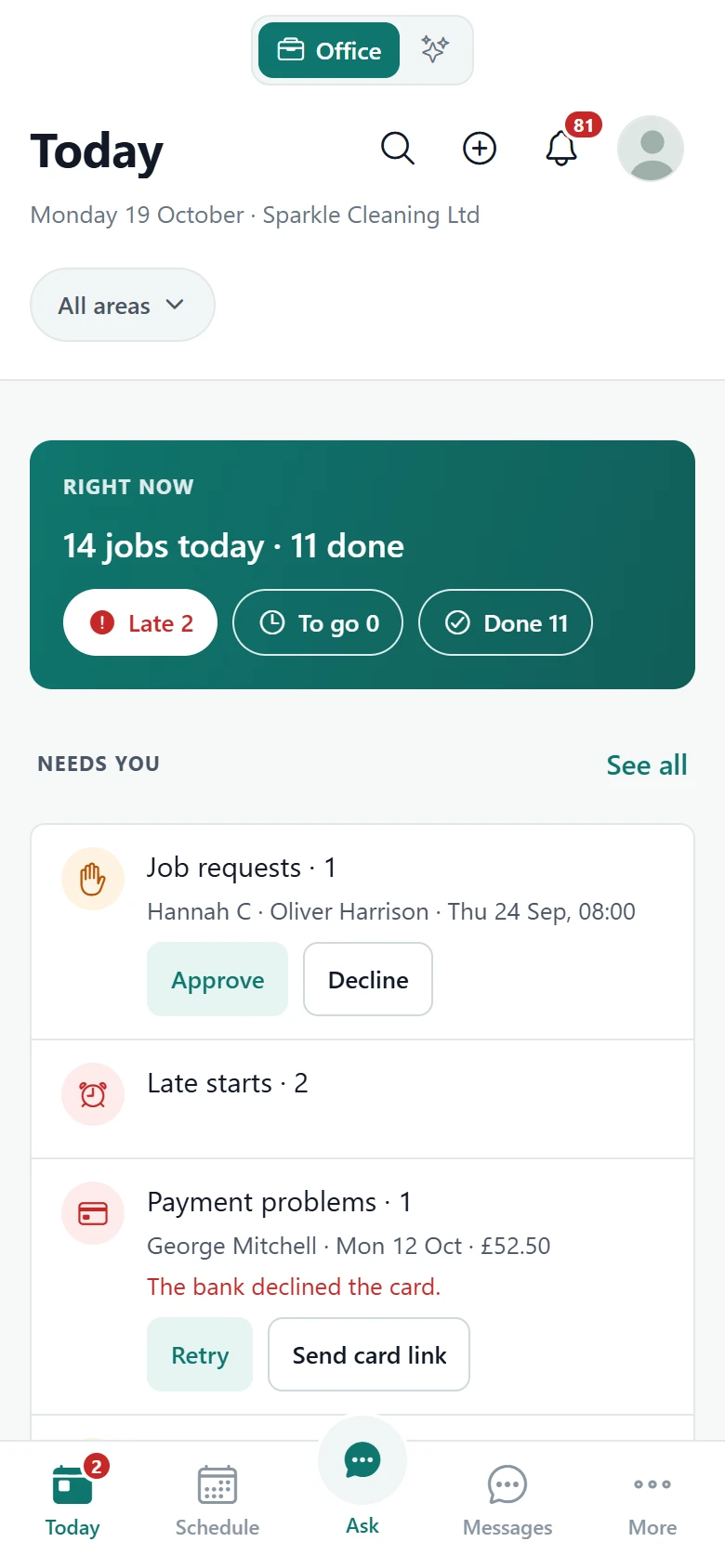
Screenshot of Office dashboard — Today

For the office

Office dashboard

Run the day from your phone: who is where, what needs you, and what is owed.

  • Today: jobs, late starts and who is clocked in
  • Approve job requests and retry failed card payments in one tap
  • Bookings, customers, invoices and charges
  • Cleaners, timelogs, payslips and job photos
  • The AI assistant in chat (Enterprise plan)
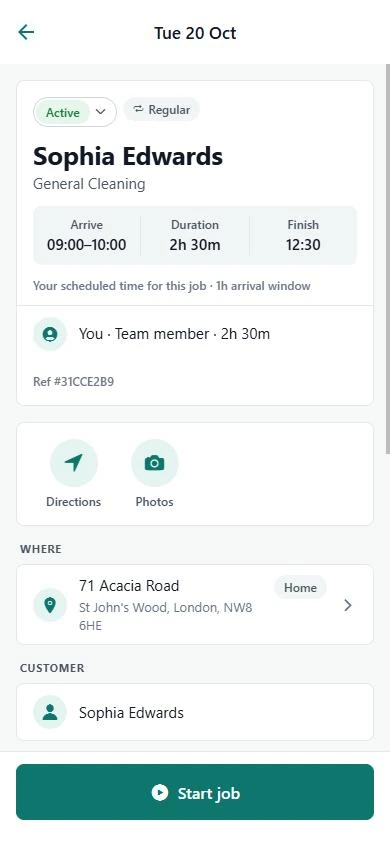
Screenshot of Cleaner dashboard — Job details

For cleaners

Cleaner dashboard

Today's jobs, clock-in, photos, chat and pay, on the phone in their pocket.

  • Today's jobs with clock-in status
  • Address, notes, checklists, photos and directions on every job
  • Request open jobs and chat with the office
  • Availability, reviews and payslips

Plan availability

Which plan has what.

The parts of the reference that arrive with Business or Enterprise, read from the plans themselves. Limits on cleaner accounts, office users and service categories are compared on the pricing page.

Plan availability by feature
CapabilityProfessional£59 pounds per month$79 US dollars per monthBusiness£119 pounds per month$149 US dollars per monthEnterprise£199 pounds per month$249 US dollars per month
Business and above
Team calendar viewsIn CalendarNot includedIncludedIncluded
PayrollIn PayrollNot includedIncludedIncluded
Pay split between cleanersIn PayrollNot includedIncludedIncluded
RecruitmentIn RecruitmentNot includedIncludedIncluded
Website builderIn Website builderNot includedIncludedIncluded
SMS with your own Twilio keysIn MessagingNot includedIncludedIncluded
Enterprise
AI assistantIn AI assistantNot includedNot includedIncluded
Your own domainNot includedNot includedIncluded
Data exportNot includedNot includedIncluded

Card payments run through your own Stripe account. SMS and voice calling connect through your own Twilio keys.

Start today

Run the whole cleaning company from one system.

Start a free trial, add your services and cleaners, and run a real week of bookings, the calendar, payments and payroll in one system.

14-day free trial on every plan. Cancel anytime, no lock-in contract.